Guide contents
Agencies
Every buying agency and what it spends.
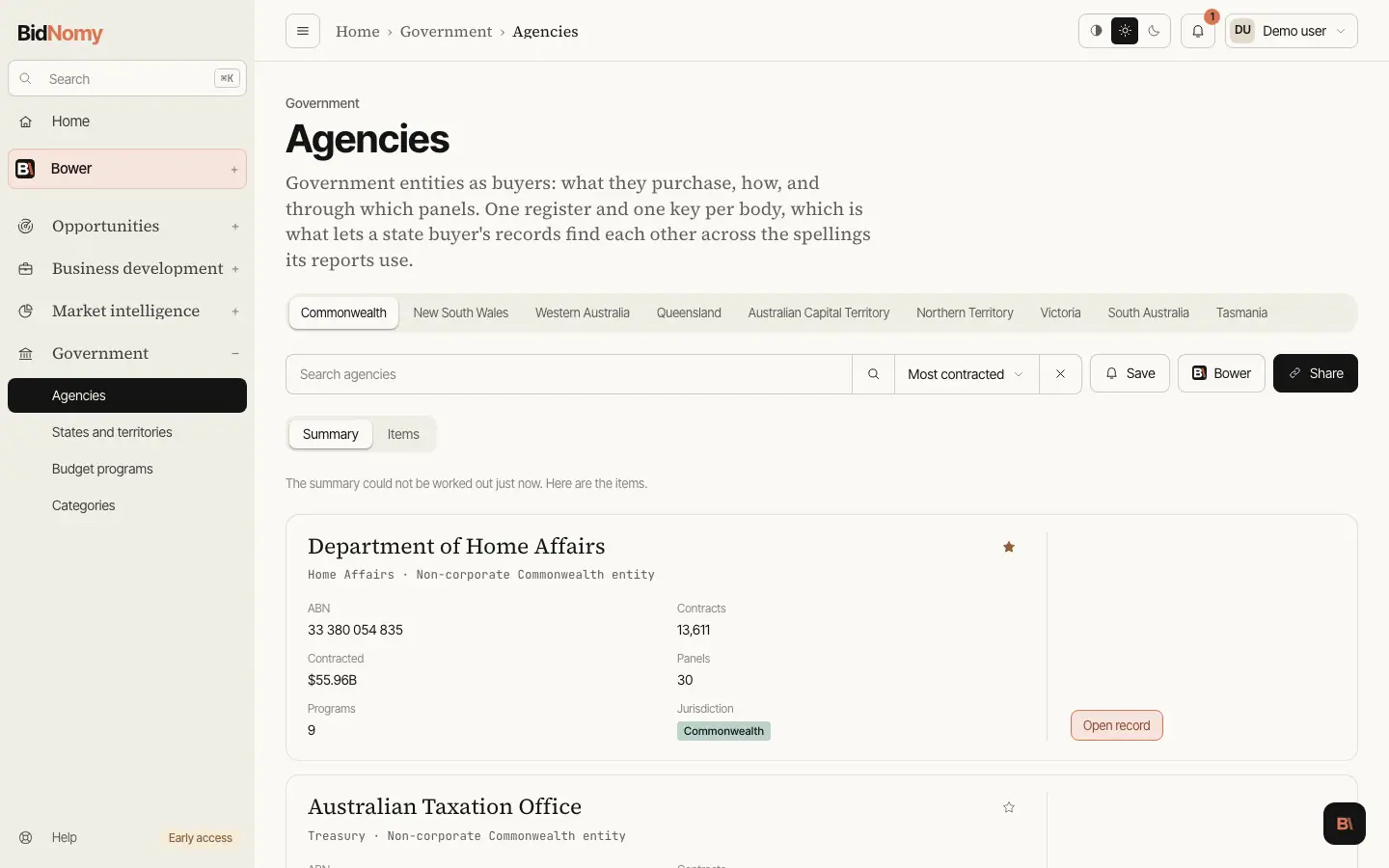
Agencies
An agency profile pulls together everything a Commonwealth entity has bought, through which methods and panels, in which categories, over which years — joined to its budget programs from the Portfolio Budget Statements. There are 197 Commonwealth entities in the register, with the trading names and abbreviations they actually publish under mapped on, so a search for an abbreviation and one for the full legal name land on the same profile.
The Commonwealth tab opens on a Summary, laid out like the Contracts summary: how many agencies, what they bought, their contracts and their suppliers (Commonwealth contracts, all years — the same figures as the cards); the top suppliers and value by month of start; each agency's share of the total and the agencies with the most contracts; and a card per portfolio with its last 12 months as bars. Click a portfolio card to narrow to it, and the cards become its agencies. Items is the list.
Each state and territory tab opens on the same Summary, built from that state's awarded contracts (standing offers left out, because their value is a ceiling), each matched to its agency through the register. The cards are its agencies, each with its last 12 months as bars. The suppliers are the whole state's, so while you search a state tab the summary asks you to clear the search to see them. Agencies publish their contracts late, some states by months, so when the last months of value by month are short of the agencies that usually report, a line under the chart names them as still filling in. The cards in a state tab's Items list carry the same state contracts, sorted the same way, and leave off panels and budget programs, which are Commonwealth records.
The public government map shows every Commonwealth portfolio as one box sized by contract value (all years, or the last 12 months), with its ministers, APS staff and three biggest buyers — no sign-in needed. Sign in to see all N bodies opens this list filtered to that portfolio (Defence includes Veterans' Affairs). Each portfolio's panel also has a short Portfolio summary written by Bower from the same figures, refreshed weekly; the small numbers after each claim are its sources, listed under the paragraph.
To jump to an agency, press ⌘K (Ctrl+K) and type its name, a former name or its initials: "ATO", "DISR", "Defence". An exact match is already highlighted, so Enter opens its page.
Where Directory.gov.au lists the agency, its page also shows the website, main phone number and public enquiry lines, with the date the directory last updated them. The directory's description is in the About card under the figures: its first sentence, with More for the rest. Where every dataset comes from, and its licence, is on Data sources and methodology.
The register is no longer Commonwealth-only. Queensland's bodies were loaded into it as its first state wave, and New South Wales, Western Australia, the Australian Capital Territory, the Northern Territory, Victoria and South Australia have followed on the same keys — which is why the agency list has a tab for each of the eight governments. It matters because Queensland's publishers do not agree with each other about names: the forward procurement pipeline writes "Department of Education" and that department's own contract disclosure report writes "DoE", and across the whole file not one of the 38 pipeline agency names matches an award agency name. The register is what makes them one buyer — so a Queensland plan links to that buyer's awards, an award links to its forward plan, and the entity page gathers both. A body the wave does not hold keeps the name its publisher used and simply carries no link; nothing is guessed. And a state entity's page shows the two blocks its records actually live in rather than the Commonwealth four, because contracts, panels and budget programs are AusTender figures and read zero for a state body.
Following an agency
Follow (the star) on an agency's page, on its card in the agency list and on its row in Top buyers follows it for your whole team: everyone in your organisation sees it followed, and anyone can click Following to unfollow it. The agencies your team follows feed Followed agencies on Government and Opportunities. A team can follow up to 200 agencies.